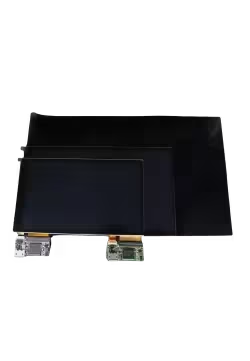
Vonger VoCore – USB Displays for Sim Racing and DIY Electronics
Vonger VoCore develops compact LCD displays and electronic solutions for embedded devices. VoCore screens have become popular in sim racing because of their small dimensions, USB connectivity and compatibility with SimHub dashboard software.
These displays can be used to build custom racing dashboards, steering wheels with integrated screens, telemetry panels and electronic control interfaces. Instead of keeping all information on the main computer monitor, drivers can position important vehicle data directly behind or inside the steering wheel.
The Vonger VoCore range at Simline.eu includes the VoCore Screen, available in several sizes and controller configurations. From compact displays for custom steering wheels to larger ultrawide telemetry screens, the range offers plenty of options for DIY simulator projects.
VoCore Displays with SimHub – Racing Telemetry at a Glance
One of the most common applications for VoCore displays is showing real-time racing telemetry through SimHub.
Depending on the selected dashboard layout and the information supported by the simulator, the screen can display engine RPM, gear position, speed, tyre temperatures, brake temperatures, fuel levels, lap times, racing flags and other vehicle information.
SimHub includes Dash Studio, allowing users to select existing dashboard layouts or create their own. Colours, indicators, fonts and graphics can be adjusted to suit different vehicles and driving preferences.
A Formula-style display can focus on engine RPM, gear position and race information, while a GT dashboard may include additional temperatures, fuel calculations and timing data.
Correctly configured, a VoCore screen provides dedicated telemetry without requiring the driver to keep a large in-game HUD visible on the main monitor.
VoCore V7B – Classic USB Displays with microUSB
The V7B controller family provides a practical foundation for custom LCD projects.
The variants described at Simline.eu include 4", 4.3", 5" and 6.8" screens. They use USB 2.0 communication and a 5 V power supply through microUSB.
The 4" and 4.3" versions offer resolutions of 480 × 800 pixels. The 5" display uses 480 × 854 pixels, while the wider 6.8" screen provides 800 × 480 pixels.
According to the published specifications, V7B supports 16-bit and 24-bit colour modes, with refresh performance of up to 30 frames per second in 16-bit mode or 24 frames per second in 24-bit mode.
These models are suitable for dashboards displaying numbers, RPM indicators, gear changes, warning messages and relatively simple animations.
VoCore MPRO – Updated Controllers and USB-C Connectivity
MPRO is the newer VoCore display controller family, designed for projects requiring higher refresh performance and updated USB connectivity.
Compared with V7B, MPRO configurations use USB-C and can provide smoother screen updates depending on the model and rendering method.
The versions described in the Simline.eu catalogue include 5", 3.4" round, 7.85" ultrawide and 10" screens.
The 5" MPRO model features a resolution of 480 × 854 pixels, while the 3.4" round display provides 800 × 800 pixels.
MPRO is particularly useful for racing dashboards with detailed graphics and animated telemetry elements. Actual refresh performance depends on the specific controller revision, software and the way frames are transmitted to the display.
VoCore 3.4" Round – Circular LCD for Custom Instruments
The VoCore 3.4" Round MPRO is designed for applications where a traditional rectangular screen is not ideal.
Its 800 × 800 pixel resolution and circular display area make it suitable for digital gauges, tachometers, speedometers and aircraft-style instrument panels.
In sim racing, a round display can be used to recreate the appearance of classic vehicle instruments or build a dedicated dashboard featuring a large central gauge.
The unusual shape also makes it attractive for custom flight simulation panels. However, dashboard graphics and the enclosure must be designed specifically for a circular screen to make proper use of the available display area.
VoCore 5" and 6.8" – Popular Racing Dashboard Sizes
For traditional GT and Formula racing dashboards, the 5" and 6.8" VoCore displays offer a practical balance between screen size and installation space.
The 5" display provides sufficient room for a large gear indicator, engine RPM, fuel data, temperatures and other essential telemetry.
Its compact dimensions make it easier to install above a Direct Drive wheelbase without covering a significant portion of the main monitor.
The 6.8" model offers a wider screen, making it suitable for dashboard designs with several information groups positioned next to each other.
Both sizes can be installed in a custom enclosure or used as the display component of a complete racing dashboard.
VoCore 7.85" Ultrawide and 10" – Larger Telemetry Displays
For projects requiring more screen space, the VoCore MPRO family also includes the 7.85" Ultrawide and 10" displays.
The 7.85" Ultrawide model features a 1280 × 400 pixel resolution. Its wide format makes it possible to arrange multiple telemetry sections across the screen, including RPM, gear position, tyre temperatures, fuel levels and timing information.
The 10" display offers a resolution of 1024 × 600 pixels and is intended for larger dashboards or control panels where readability and the ability to display several instruments are important.
These displays require more installation space, so users should check the panel dimensions, driver board placement and cable routing before designing the enclosure.
VoCore Screen Comparison – Sizes and Resolutions
The following table summarises the display configurations described on the Simline.eu product page. Check the product options for the availability of a specific size and controller combination.
| Variant |
Resolution |
Controller |
Connection |
| 4" |
480 × 800 |
V7B |
microUSB |
| 4.3" |
480 × 800 |
V7B |
microUSB |
| 5" |
480 × 854 |
V7B / MPRO |
microUSB / USB-C |
| 6.8" |
800 × 480 |
V7B |
microUSB |
| 3.4" Round |
800 × 800 |
MPRO |
USB-C |
| 7.85" Ultrawide |
1280 × 400 |
MPRO |
USB-C |
| 10" |
1024 × 600 |
MPRO |
USB-C |
How to Connect a VoCore Display to a PC
VoCore screens communicate through USB 2.0 rather than a conventional HDMI or DisplayPort video connection.
However, these are specialist electronic display components, not ordinary computer monitors that automatically appear as additional screens in Windows display settings.
To operate a VoCore screen, users need compatible software capable of sending data through the VoCore USB interface.
For sim racing, SimHub is the most common solution. After connecting the screen, the user must configure USB VoCore display support, select the appropriate hardware and assign a dashboard layout.
Additional driver or software configuration may be necessary depending on the operating system and controller revision.
Always use a USB cable with data transmission capability. A charging-only cable may supply power but cannot transfer dashboard graphics correctly.
VoCore Screens in Formula Steering Wheels and Button Boxes
The compact dimensions of VoCore displays make them suitable for integration directly into custom sim racing steering wheels.
In Formula and GT wheels, a screen positioned near the driver's hands can show gear changes, engine RPM, temperatures and warning messages without requiring a separate dashboard above the wheelbase.
VoCore displays can also be installed in button boxes or on standalone mounting brackets attached to the cockpit.
This allows drivers to add telemetry functionality even when their steering wheel does not include a built-in display.
DIY installations require suitable electronics mounting, USB cable routing and a protective enclosure. Special attention should be paid to the edges of the LCD panel and the connections between the driver board and display.
VoCore Screen or a Complete Simline Dashboard?
A standalone VoCore screen is a good choice for users familiar with electronics, 3D printing, enclosure design and custom device assembly.
It offers considerable freedom, but the user must provide a suitable case, mounting solution and software configuration.
For those who prefer a complete racing dashboard, Simline.eu also offers the Simline Dashboard 5 Inch VoCore Edition v2 and Simline Dashboard 6.8 Inch VoCore Edition v2.
These are separate products manufactured by Simline using VoCore display technology. They include aluminium housings, dedicated control electronics and programmable RGB LEDs for RPM indicators and other racing information.
VoCore Display Installation and Handling
VoCore screens are intended to be integrated into larger electronic devices. Careful handling is therefore essential, particularly when designing mounting brackets or connecting cables.
The connectors on the driver boards are not intended to withstand repeated mechanical strain. Pulling cables, bending delicate ribbons or applying pressure to the display can damage the assembly.
The manufacturer also warns that the internal LCD glass is extremely thin. A suitable enclosure should protect the screen surface and corners from pressure and impacts.
Before ordering, check the dimensional drawings and connector type of the selected variant to ensure that it will fit the intended steering wheel or dashboard housing.
VoCore Displays for Flight Simulation and Embedded Electronics
VoCore displays are not limited to racing simulators. They can also be used in custom flight simulation panels for Microsoft Flight Simulator, X-Plane and DCS World, provided the selected software supports sending the required data to the display.
Possible applications include digital flight instruments, engine indicators, navigation displays and custom aircraft information panels.
Outside simulation, VoCore screens can be integrated into embedded electronics projects, Raspberry Pi systems and other devices using compatible USB display drivers.
As with racing dashboards, the final capabilities depend on the software, hardware configuration and communication interface used by the project.
Which VoCore Display Should You Choose?
For a compact dashboard or custom steering wheel, the 4" and 4.3" models provide useful screen space without requiring a large enclosure.
The 5" display is a versatile choice for GT and Formula dashboards, while the 6.8" version is well suited to wider layouts with several telemetry indicators.
The 3.4" Round MPRO is particularly suitable for circular instrument designs. The 7.85" Ultrawide provides additional horizontal screen space, while the 10" model is intended for larger telemetry and control panels.
Explore the VoCore Screen options at Simline.eu to select the size and controller that best suit your DIY simulator project.
For technical specifications, dimensional drawings and development resources, visit the official VoCore website.
Less

 English
  Polski